Strategizing Mobility
After pilot projects in mobile computing from 1995 to 1997, Seton Hall University
rolled out a full-scale laptop program in 1998. The effort, known formally as
the Mobile Computing Program, was a standard- fare laptop initiative: Starting
that year, all freshmen were required to have a portable PC. The school purchased
IBM (www.ibm.com) ThinkPad
laptops and leased them to students at a discount. To counterbalance the expense
for students at need, Seton Hall officials increased the pool of financial aid
and gave priority to those who qualified. By 2001, every student on campus went
through the program and bought a new laptop. Coupled with the school’s growing
wireless network, the laptops facilitated computing from just about anywhere
on the school’s South Orange campus. On the surface, everything was great.
Behind the scenes, however, CIO Stephen Landry says that technology officials
knew they had to take additional steps to ensure that students used the laptops
as part of their everyday experiences. The first approach to this strategic
enforcement of mobile computing was what Landry calls “curricular integration,”
an effort to support and encourage faculty to integrate the use of laptops in
the curriculum. At the center of this endeavor is the Teaching, Learning, and
Technology (TLT) Center, a multi-disciplinary facility that financially
motivates educators to build entire lessons around laptops: The center doles
out a total of $250,000 in multi-year grants to academic departments willing
to redesign core courses around mobile technology. Paul Fisher, the center’s
director, says the grants are some of the most sought-after dollars on campus
today.
| GREAT IDEA
|
|---|
At Georgetown, a database was designed to store content freely,
and utilize XML to deliver it on demand in real time, to just about any
kind of device, in virtually any form or format a user requested. For
Georgetown, the missing mobile computing piece was making sure
that content was as mobile as the technology itself.
|
“The whole idea was to inspire our faculty and department heads to use mobile
technology to improve student learning,” says Fisher, who notes that the center
also rewards Faculty Innovation Grants of up to $5,000, for individual educators
who embrace mobility. “We wanted to make sure we weren’t just handing out an
expensive word processor.”
Faculty-centered incentives weren’t Seton Hall’s
only approach to solidifying mobile computing on campus: Landry and his colleagues
launched an internal marketing effort aimed at students, too. For starters,
through a special laptop group within the IT department, the university set
up a number of support services such as maintenance and repair. Next, the school
mandated that all freshmen take a skills class called “University Life” in their
first semester on campus. While this class g'es over basics such as studying
effectively and saying no to drugs, it also includes several hours of tutorials
on how to use the ThinkPads, how to connect to the wireless network, and how
to keep anti-virus software up-to-date. Though most students term the class
“cheesy,” Landry says it works wonders, nearly eliminating help desk requests
from first-time users.
The final leg of the strategy to ensure the success of Seton Hall’s mobile
computing effort is a system of checks and balances dubbed the Mobile Computing
Assessment Program. The program, designed in 1998 to provide prompt feedback
to the planning team, consists of an annual survey administered to a random
sample of undergrads at the school. Survey items and their analysis are managed
by a team of faculty members, administrators, and technologists. After every
survey, the team shares results with the campus community and the larger educational
community, via conferences and publications. Clearly, something’s working: by
the 2003 survey, 89 percent of 275 responding students reported that they were
“satisfied or very satisfied” with the use of mobile IT in their courses.
Smarter
Smartphones
Technologists have seen the future of mobile computing at Carnegie Mellon University,
and that future revolves around smartphones that actually are smart. You know
the smartphone: any handheld device that integrates personal information management
and mobile phone capabilities. At CMU, however, researchers under the leadership
of Professor Asim Smailagic have developed a mobile, wearable system that is
one part PDA, one part cell phone, and one part virtual secretary—it can screen
calls and send them to voicemail if the user is in the middle of a class or
important meeting. The system, dubbed SenSay (for “sen”sing and “say”ing), is
currently in pilot phase at the university’s Pittsburgh campus, and could be
implemented on a broader basis as soon as next year.
| GREAT IDEA
|
|---|
| At Carnegie Mellon University, researchers have developed a mobile,
wearable system that is one part PDA, one part cell phone, and one part
virtual secretary. By “sensing” the wearer’s environment and
situation—
say, if the user is in the middle of a class or important meeting—it can
screen calls and send them to voicemail.
|
Smailagic bills the portable system as a “context-aware” mobile phone. It consists
of an ordinary mobile phone, a sensor box mounted on a user’s hip, and voice
and ambient microphones mounted somewhere near the user’s neck. The microphones
record sounds in the user’s environment (including the user’s own voice), and
software in the sensor box analyzes the data to determine what kind of situation
the user is in. After comparing this data with a certain set of rules, the software
decides what to do with the call. If, for instance, the program determines that
the user is in a lecture or meeting, all incoming calls are sent immediately
to voicemail. If, on the other hand, the program determines that a user is in
the middle of a conversation, calls ring through in silent mode, vibrating to
notify the user that someone’s on the line.
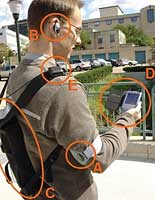
AT CARNEGIE MELLION, smart phones are
smarter than elsewhere: the 'SenSay devices
screen calls and even clam up during classes.
“The way we see it, this research takes mobile computing to the next level,”
says Smailagic, who predicts the system will retail for $200 when it hits the
general market. “Instead of having to worry about interrupting students in a
particular environment, the phone d'es all of the thinking for them.”
Down the road, Smailagic hopes to network SenSay systems into the school’s
wireless network, and create a plug-in application that expands the context
for these context-aware tools. Specifically, researchers are working on ways
to enable SenSay units to interface with user course schedules and Global Positioning
System (GPS) maps of campus. Under this expanded approach, the system will rely
even less on its microphone inputs; if a student is sitting in a lecture hall,
or his course schedule indicates that he is in a lecture, the phone system will
assume the student is busy and send calls to voicemail. While SenSay d'esn’t
account for a user’s free will, it certainly would enable responsible students
who don’t skip class to focus on learning. In the end, at least in higher education,
that’s what mobile computing is all about.
Step up to Smart Podia
One of the largest private institutions
in the nation, New York University is currently innovating
through mobility. Case in point: the school’s “smart podia,” a variety of pedestals
that enable professors to access and utilize lecture materials from any folder
on the campus network.
The devices, which are set up in only certain classrooms, essentially are stationary
networked computers equipped with all of the latest in presentation technology.
From them, professors and lecturers can log into Web-based storage folders,
access notes, PowerPoint slides, or other support materials, and control the
flow of a presentation with the click of a button. Because the podia are connected
to the campus network, they eliminate the need for users to lug laptops or note
folders to class.
Marilyn McMillan, associate provost and chief information technology officer,
says the podia are amalgamations of products from a number of different vendors,
and notes that on top of standard wireless computing, they are one way in which
NYU utilizes mobility to improve the life of its constituents. “[The podia]
certainly make everyone’s lives easier,” she says. “When it comes to mobility,
having a certain number of worthwhile technologies g'es a long way.”