Managing Classroom Technology Using AMX MeetingManager
Many educational institutions today are faced with the challenge of having
a small instructional technology staff tasked with managing a large classroom
technology deployment spread across campus. For Lafayette College, AMX Corporation’s
MeetingManager software has become a useful tool in alleviating this challenge.
Lafayette College currently has fifty-eight smart classroom installations in
twelve buildings, with five more coming online this summer. These installations
include one or more projectors, computers, document cameras, VCRs, DVDs, and
other specialized equipment. The rooms all have AMX Netlinx controllers and
AMX Touch Panels. The Instructional Technology (Itech) Department is comprised
of four individuals, with two responsible for managing these classroom technologies.
Lafayette’s Itech department recognized the potential of AMX’s
Netlinx systems in 2001, and began deploying them as the basis of what we hoped
would become an enterprise-grade A/V solution. Having the classroom control
systems as devices on the campus LAN provided the groundwork for developing
a remote management solution, and so, in 2002, Lafayette along with its AV Integrator,
Vistacom Inc., began developing custom code modules to accomplish those goals.
The introduction of AMX’s MeetingManger software in the fall of 2003 greatly
simplified and accelerated the process we had been working toward. After a trial
deployment of nine classrooms in the fall, we rolled out the MeetingManager
software to all our Netlinx systems over the semester break.
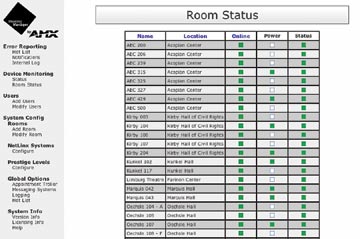
MeetingManager provides a continuously updated snapshot
view of room status.
MeetingManager provides Lafayette with:
- Real-time monitoring of system status, including notification of imminent
problems in certain devices before they fail
- A help system for classroom users, with immediate response and feedback
capability through the classroom Touch Panels
- A system to remotely manage smart classroom technology
- A method of asset tracking
- Data regarding equipment usage
MeetingManager also includes a scheduling component which can be integrated
with group messaging systems to allow for scheduling of classrooms and creation
of “presets” these can be executed at a designated time, such as
powering on the system, selecting a source, and lowering lights, among other
functions. If a campus d'es not use a groupware messaging system, the institution
can import a text file generated by its scheduling software.
MeetingManager is a Web-based application running on a Windows server, which
allows Itech staff to access the application through a browser anywhere on campus.
During the day one or more of the Itech staff will keep a browser window open
with either the “Hot List” or “Room Status” pages open.
The Hot List provides a listing of any parameter that has exceeded the user-defined
thresholds. For example, a “Help Request” is generated if a user
hits one of the “Help” buttons on the classroom Touch Panel, or
a “Maintenance Request” is generated if the projector lamp hours
exceed a defined value.
The “Room Status” page provides an overview of all systems—including
whether they are online, powered on, and their current status. The data on these
pages is refreshed every thirty seconds.
Information such as system serial number, IP address, firmware revision, and
security status is also available with a click of the mouse. Additionally, because
the software is Web-based and user-configurable, system variables such as an
auto-shutdown time no longer need to be coded into the Netlinx program; they
can simply be entered into the appropriate field in the Web interface.
Another feature Lafayette has found valuable is the messaging capabilities
of the software. We are able to configure a matrix of communication options
based on rooms or defined users.
Additionally, all events are logged. In addition to help requests and maintenance
items, we use this capability to track equipment usage. Six reports come “out
of the box,” including equipment usage and lamp hours, to name a few.
Since MeetingManager uses Microsoft Access as its database engine, it is relatively
easy to create custom reports.
MeetingManager is a valuable tool for an educational environment. It is a true
enterprise-grade solution, supplying real-time, empirical data to evaluate return
on investment, and easy-to-use tools to help manage your campus technology investment.