Google Intros Learning-Themed AI Mode Features for Search
Google has introduced new features for AI Mode in Search, aimed at enhancing learning and exploration. The updates are being introduced ahead of the back-to-school season.
Image and PDF Interactions
Users can now ask questions about images on desktop browsers, a capability previously available on Android and iOS devices. Support for PDF uploads on desktop will be added "in the coming weeks," allowing users to query detailed information from documents. For example, a user could upload psychology lecture slides and ask follow-up questions.
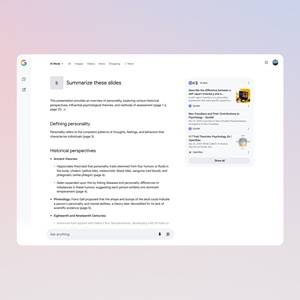 [Click on image for larger view.] File Upload in AI Mode (source: Google).
AI Mode will analyze the file content and cross-reference it with web information to provide a response with linked sources. Image and PDF uploads on desktop are launching in the U.S. Future updates will include support for additional file types, such as those from Google Drive.
Canvas for Organization
The new Canvas feature in AI Mode assists with planning and organizing information. Users can create study plans or other projects, with AI Mode populating a dynamic side panel that updates with refinements. The upcoming upload feature will enable customization with context from files like class notes. Canvas projects can be revisited across sessions.
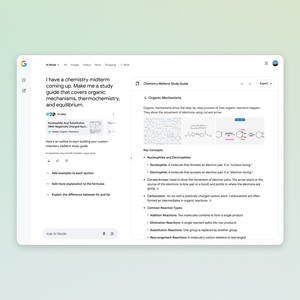 [Click on image for larger view.] Canvas in AI Mode (source: Google).
This feature is also rolling out "in the coming weeks" to users in the AI Mode Labs experiment in the U.S., accessible via a "Create Canvas" option when planning is requested.
Real-time Assistance with Search Live
Search Live with video input is being introduced, incorporating capabilities from Project Astra. This feature allows users to engage in real-time, back-and-forth conversations with Search in AI Mode, utilizing live camera feed for visual context. It integrates with Google Lens.
 [Click on image for larger view.] Search Live with Video (source: Google).
To use it, users open Lens in the Google app, tap the Live icon, and ask questions while pointing their camera. Search Live with video input is rolling out "this week" on mobile in the U.S. for users in the AI Mode Labs experiment.
Browse Integration with Lens in Chrome
Google Lens in Chrome and AI Mode will allow users to search and learn about content on their desktop screen, including websites and PDFs. Soon, clicking the Chrome address bar will present an option to "Ask Google about this page."
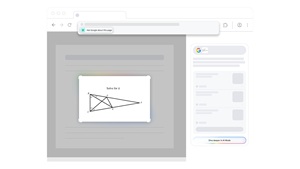 [Click on image for larger view.] Lens in Chrome (source: Google).
Users can select a specific element, such as a diagram, to receive an AI Overview in the side panel. This week, users will be able to ask follow-up questions through AI Mode by selecting AI Mode at the top of Lens search results or via a "Dive deeper" button at the bottom of the AI Overview.
Back to School
A Google exec characterized the new features as being "just in time for the back-to-school season."
"Whether you're a student, a parent or an educator — or just wrapping up a busy summer — AI Mode can help you explore complex questions and discover high-quality information from across the web. To get started today on desktop, look for the new AI Mode button on the Google homepage," the company said in a blog post.
For more information, visit the Google site.
About the Author
David Ramel is an editor and writer at Converge 360.