Microsoft Revamps Loop Collaboration Platform
Microsoft Loop, the online collaborative platform in Microsoft 365, is getting a number of new features and an overall redesign.
In a series of tweets on X, Microsoft announced some of the new changes coming to what it's calling Loop 2.0. The most noticeable change is a more streamlined UI, coupled with a new URL, https://loop.cloud.microsoft. Microsoft said the new URL change was made to simplify access to its online services by reducing sign-in prompts and delays.
Key updates in Loop 2.0 also include a new left-side navigation menu that provides easier access to meeting notes, favorites, and recent items. A prominent "Create" button now allows users to start new workspaces or draft ideas from anywhere within the app, a feature previously limited to the home page.
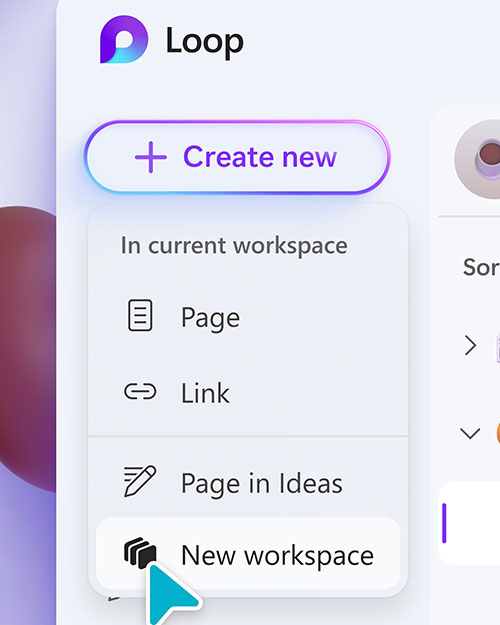 [Click on image for larger view.] Figure 1. You can see the new redesign, along with the revamped "Create" button.
New to 2.0, the Favorites tab offers access to frequently used workspaces, while the Recent tab allows users find their latest Loop pages and components, including those created in other Microsoft 365 apps like Teams, Outlook, OneNote and Whiteboard.
Microsoft has also added a Meeting Notes tab, which aims to keep users better organized. "For those of you on top of your game, you can even put in pre-read notes or agenda items for all of your upcoming meetings," tweeted Microsoft. "Or easily find your meeting notes from weeks ago!"
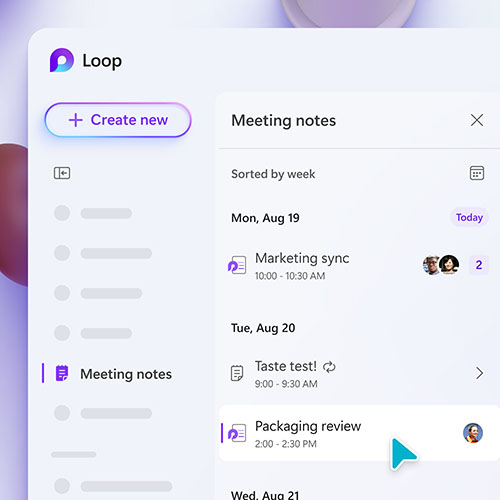 [Click on image for larger view.] Figure 2. The new Meeting Notes tab in Loop 2.0.
Microsoft has started a gradual rollout of Loop 2.0 and said that all users should "see it very soon."
For more information, visit the Microsoft site.