U Wisconsin Expands Collaboration with Office Live Workspace
- By Linda L. Briggs
- 04/09/08
Students at the
University of Wisconsin at Parkside can now enjoy file collaboration capabilities via a free software-and-service product from Microsoft called
Office Live Workspace. The university, which last year outsourced its student e-mail accounts to
Microsoft Live@edu, now offers students, faculty, and staff the ability to store, share, edit, and collaborate on documents in common Microsoft file formats including Word, PowerPoint and Excel. Students can use Office Live Workspace to organize study groups, work together on assignments, share class notes, and keep shared schedules and group task lists.
Microsoft unveiled the "software plus services" offering, Office Live Workspace, last year as a free online extension of the Microsoft Office suite. As such, Office Live Workspace frees students, faculty, and staff from the campus network, allowing them to access and collaborate on documents online anywhere that they have an Internet connection and a browser.
The university implemented Microsoft Live@edu in April 2007 for its e-mail and message capabilities; this March, it followed with its introduction of Office Live Workspace. According to CIO Ann Marie Durso, "this gave us a way, at no added cost and on a platform and environment [university users] are already familiar with, to expand the ability to interact, to collaborate, and to store beyond just mail messages."
Previously, the university offered limited storage space to each student with his or her e-mail account. To share or exchange a large file, students resorted to devices such as a flash drive. And users had to be on campus to log in and use the campus facilities and network--a significant constraint for commuter students. With Office Live Workspace, students can use a browser to access documents online anywhere that they have an Internet connection. With Office Live Workspace's
collaborative features, they can also share documents.
Through Live@edu, the university can offer each e-mail user 5G of mail storage; Durso said that Office Live Workspace doesn't come with a specific size constraint, but is advertised as allowing each user to store up to 1,000 documents.
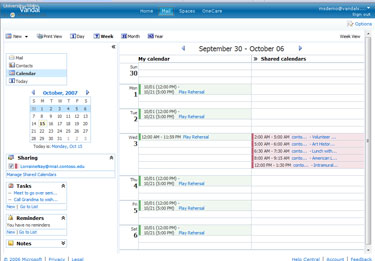 Calendar feature in OLW
The university rolled out Microsoft Live@edu to improve and extend the e-mail services it offers students. Durso said that the university migrated not only all current students to the outsourced e-mail system last year but gave an account to each student going back two years, as well as prospective, graduate and continuing education students--some 14,000 accounts total. By outsourcing e-mail to Micrsoft Live@edu, Durso gains benefits that include lifetime e-mail accounts for each student, no hardware or software to maintain, including no backup chores, and much more space per e-mail account than she could offer students previously.
After its success with e-mail accounts in Live@edu last year, Durso saw the benefits in expanding a year later to Office Live Workspace--especially free of charge. "It gave us an opportunity, at no added cost, to move beyond just mail communications--and messaging and calendaring and some of the other capabilities [in Live@edu]--to start to store and share documents, coursework, and notes," Durso explained. "It's a nice compliment to further supporting collaboration and interaction with faculty and staff and one another, all on existing accounts."
Anyone running Microsoft Office--the university's standard desktop software package--can use Office Live Workspace as an online extension of familiar Microsoft Office applications to view, change and save any standard office file, including Word, PowerPoint, and Excel, using a browser interface. Collaboration capabilities can track who has made what changes to a file. A document in Microsoft Word, for example, can be edited in a shared version over Office Live Workspace just as it would be in Word.
Users who aren't running Microsoft Office get a limited set of capabilities: They can view and mark up shared documents, for example, but can't create them or make substantial changes. To do that, they need to download a document to a machine running a full version of Microsoft Office. Durso said students are also using the collaboration capabilities to exchange Microsoft Access databases.
Durso first introduced several early-adopter faculty volunteers to Microsoft Live Workspace, choosing those with coursework that lent itself to collaboration. The university "had toyed with some freeware wikis" in response to faculty requests for collaborative abilities, she said, but nothing was yet part of the standard software infrastructure.
After two pilot efforts within different areas of the university, the school began to offer the product campus-wide in early March. One thing Durso is waiting for is reports and statistics on just who within the university is using the new product--something she doesn't yet have access to.
To raise awareness of the new product and generate excitement, the university launched an internal communication campaign, with help from Microsoft, including banners, handbills, and information tables, to encourage use. "We didn't want them not to use it because they weren't aware of it."
Along with collaboration capabilities, freeing students from the campus network is a big plus of Office Live Workspace, according to Durso. "A good percentage of our students are commuters who work in the community as well as attend college," she explained. "This gives them the ability to interact and do group coursework and collaboration in a platform environment that Microsoft provides. It extends our network."
One concern she hears from colleagues at other schools, Durso said, is a common issue around outsourcing a key service like e-mail--worries about a loss of control. But "we still maintain control on the front end," Durso pointed out, and said she maintains the same best practices around e-mail and document control, such as prohibiting auto-forwarding of e-mail. "You have to be practical and realistic about what you can do with technology and standards and control ... and this doesn't change any of that."