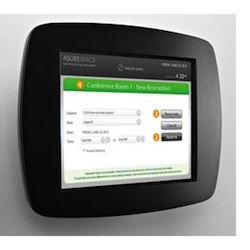
Asure Software Produces Scheduling Touch Panels


The AsureSpace Touch Panel allows users to access scheduling and information about room use.

A company that sells facilities scheduling software has released a touch panel product that allows users to check scheduling and other aspects of room use via the interactive device. Asure Software, which develops Meeting Room Manager, now offers AsureSpace Touch Panels, intended to be placed around the office to allow staff to check schedules; confirm audio-visual or other technical equipment; and book classes, events, and meetings on the spot.

The touch panel is a 10-inch glossy widescreen multi-touch display. The user interface works with the company's meeting room software as well as Resource Scheduler and Workspace Manager, other Asure products.

"We believe there is pent up demand for a solution with robust digital signage at an affordable price point," said Executive Vice President John Anderson.

In July 2012 the company announced that it had acquired PeopleCube, a firm that specialized in software and services intended to help organizations optimize the use of space and energy.

Asure's software has been used by Big Bend Community College, Duke University, and Southern Illinois University, among other institutions of higher education.

About the Author

Dian Schaffhauser is a former senior contributing editor for 1105 Media's education publications THE Journal, Campus Technology and Spaces4Learning.

Featured

  • Hand holding a stylus over a tablet with futuristic risk management icons

    Why Universities Are Ransomware's Easy Target: Lessons from the 23% Surge

    Academic environments face heightened risk because their collaboration-driven environments are inherently open, making them more susceptible to attack, while the high-value research data they hold makes them an especially attractive target. The question is not if this data will be targeted, but whether universities can defend it swiftly enough against increasingly AI-powered threats.

  • hand typing on laptop with security and email icons

    Copilot Gets Expanded Role in Office, Outlook, and Security

    Microsoft has doubled down on its Copilot strategy, announcing new agents and capabilities that bring deeper intelligence and automation to everyday workflows in Microsoft 365.

  • Graduation cap resting on electronic circuit board

    Preparing Workplace-Ready Graduates in the Age of AI

    Artificial intelligence is transforming workplaces and emerging as an essential tool for employees across industries. The dilemma: Universities must ensure graduates are prepared to use AI in their daily lives without diluting the interpersonal, problem-solving, and decision-making skills that businesses rely on.

  • business man using smart phone in office

    Microsoft Copilot Adds Voice Commands, Teams Collaboration, Local Data Processing

    Microsoft has introduced new features within its Microsoft 365 Copilot offering, aimed at making further foothold in the enterprise, including voice-based interaction, group collaboration tools, and an expansion of in-country data processing.