New Unified Teams App Consolidates Work, Personal, and Education Accounts
Microsoft's unified Teams app is now available. This update, which has been in preview since March of this year, consolidates work, personal and education accounts into a single Teams application, simplifying the way users connect and collaborate across different areas of their lives, according to Microsoft.
Previously, Windows 11 users had to manage two separate Teams apps — one for work or education and another for personal use. The new unified app eliminates the duplication, allowing users to access multiple accounts from one interface. To switch between accounts, users can select their profile picture in the upper right corner of the app. The app will open each account in side-by-side windows for navigation.
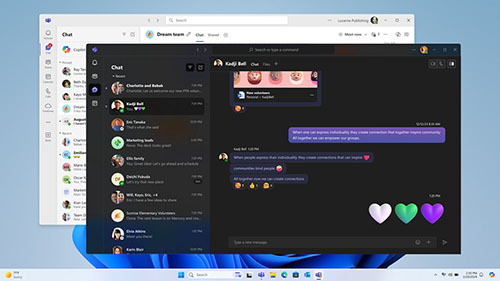 [Click on image for larger view.] Figure 1. The new unified Microsoft Teams app.
Microsoft has also made it easier for those users jumping between multiple Teams accounts. "Additionally, we know that many users have multiple Teams accounts, so we made it simple to choose your preferred account when joining a Teams meeting," wrote Microsoft. "You can also join as a guest without signing in. Whether you're joining a call to connect with a customer or discuss your school's fall fundraiser, simply select your preferred account the moment you join the meeting."
Teams for personal use is now available to all Windows and Mac users.
Enterprises wanting to jump into the new unified app can have IT push the update through. All previous administrator sign-in restrictions will still be in place with the new app.
For personal Teams accounts, the desktop app will automatically update for current users and is also available for download across platforms, including Android and Apple.
For more information, visit the Microsoft blog.