United Communications
Coming Together
Top considerations for building a unified communications infrastructure.
IN MANY WAYS, unified communications (UC) is the
Holy Grail in the world of campus telecommunications;
everybody wants it, yet the phrase means something different
to everyone. CT tackled this subject in the recent
webinar sponsored by Applied Voice & Speech Technologies, “Ten Steps for Building an
Affordable, Reliable Unified Communications Infrastructure”.
In it, AVST President and CEO Hardy Myers spoke
with CT Senior Contributing Editor Matt Villano about the
process and challenges of building UC in higher ed. Following
are highlights of their exchange, which could apply
to any consideration of UC—AVST or otherwise.
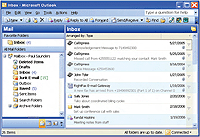
WITH UNIFIED COMMUNICATIONS, a user’s e-mail inbox serves as a repository for e-mail, voicemail, faxed messages, and more, helping optimize business processes on campus.
What exactly is unified communications? The definition
varies by manufacturer. For AVST, unified communications is
defined as communications systems that are integrated in
order to optimize business processes on campus. That
means UC is an amalgamation of technologies—telephony,
messaging, collaboration, and more.
At what stage are most colleges and universities in,
implementing UC? We are seeing an acceleration in the
replacement cycle for legacy voicemail and call processing
systems (the Octels, PBXs, and Centigrams). Whatever
brand of legacy system an institution might have, it likely has
been in place for seven, eight, 10, 15 years. Most of this
technology is in an end-of-life scenario, so customers are
investing in new and more comprehensive solutions. For
example, increasing mobility in today’s workforce is driving
demand for unified messaging and speech-based applications—
technologies users can access from anywhere.
If a school is ready to transition to UC,
how can it maximize the value of its
existing infrastructure? Many of AVST’s
client schools, for instance, use our solution
to support both a Centrex digital PBX
environment and an IP telephony environment.
As institutions continue to move
more of their faculty and staff over to IP
telephony, they tone down the digital PBX.
How important is it to evaluate your
e-mail environment before tackling UC? You must understand what your alignment
is, and then figure out how you can
enhance it with the integration of unified
messaging. We typically see higher education
customers with multiple e-mail environments,
and a need to change back and
forth from one environment to another.
Additionally, some of our larger customers
have multiple e-mail systems on campus,
and they wish to deliver a single solution.
Once you’ve leveraged your existing infrastructure and
evaluated your e-mail environment, what’s the next step? You’ve got to plan your transition to IP telephony. Ultimately,
you need to consider what we call the “Three C’s”: compliance,
confidentiality, and capacity. Each school needs to
figure out how critical these three issues are. The latest
release of our technology, for example, includes a version of
unified messaging that enables enterprises to keep messages
as confidential as possible. Whether that’s more
important than the other C’s is up to each customer.
As schools move closer to UC, how much do
they need to think about which technologies
they should keep? This is what I call the “table
stakes” conversation. Meaning, schools must sit
down and say, “Here’s what we have. Here’s what
we need. Here’s where we want to be. Here’s how
we plan to get there.” You want to be careful to roll
stuff over in an integrated, thoughtful fashion, so
you don’t end up with a solution that doesn’t meet
your requirements going forward.
Is the legacy user interface an issue in converting
to UC? It can be, but there are many solutions
that have emulation capabilities. At AVST, we’ve
built four of the major legacy telephone user interfaces
into our product, so they can be provisioned
on a user-by-user basis. So if one member of the
faculty loves the Octel interface, but somebody
else comes from an institution that used Centigram,
they can each use what makes them comfortable.
While that sounds like it might be an
administrative nightmare, we’ve been able to do
it—and it ends up facilitating the organization’s
transition to UC.
Are two other goals of UC to enhance administration
and reduce costs? Of course. You want
to reduce the workload, and you want to centralize
administration. You also want to allocate the
administration responsibilities to different segments
of the IT staff. All of those things help
reduce costs.
In which UC features are schools most interested? Notification capabilities: The ability for the
system to tell me that someone is trying to find me,
that someone’s left me a message. That’s a big
one, and it will only continue to become more
important as the workforce becomes more mobile
down the road.
Do schools tend to overspend when they buy
into UC? It’s important to buy only what you
need. You may have a certain segment of the faculty that
just wants to have traditional voicemail, but you also may
have other members of the faculty who are very e-mailcentric
and highly mobile. In general, economics is a critical
issue. There’s great technology out there for a good
price, and I encourage everyone to conduct the investigation
and determine the best way to get UC at a fair and
reasonable price.
About the Author
Matt Villano is senior contributing editor of this publication.