GA Tech Google Glass App Does Captioning
- By Dian Schaffhauser
- 10/06/14
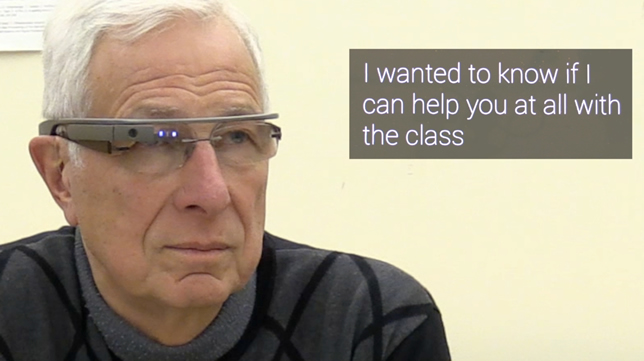
Could Google Glass help people who are deaf or hard of hearing participate in everyday conversations? A group at the Georgia Institute of Technology College of Computing has developed speech-to-text "Glassware" that does just that. The person who is hard of hearing wears Glass while another person speaks directly into the smartphone. That speech is converted into text that shows up on Glass' display.
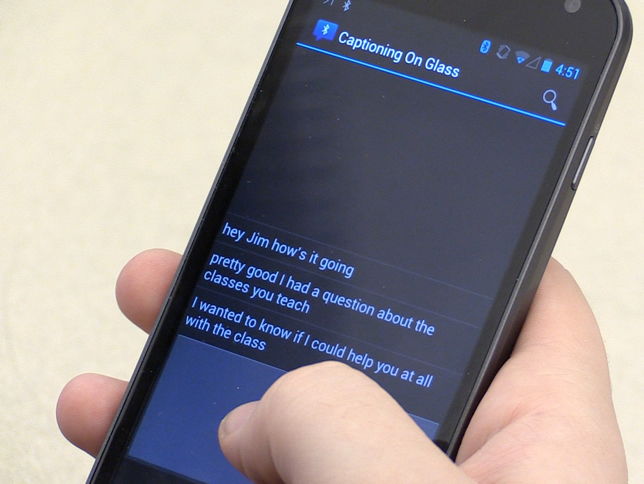
Captioning on Glass is currently available to install from Glassware, Google's site for Glass add-on software.
The idea came when a member of that college said he was having trouble hearing and suggested that Glass could help him.
"This system allows wearers like me to focus on the speaker's lips and facial gestures," said School of Interactive Computing Professor Jim Foley. "If hard-of-hearing people understand the speech, the conversation can continue immediately without waiting for the caption. However, if I miss a word, I can glance at the transcription, get the word or two I need and get back into the conversation."
Professor Thad Starner led the development effort through the Contextual Computing Group, which is working on a number of learning initiatives, including CopyCat, a game that helps deaf children develop language skills and working memory as they play it.
According to Starner, the phone-to-Glass approach encourages speakers to speak more clearly, avoiding fillers such as "uhs" and "ums." If captioning errors occur, the app lets the speaker edit mistakes and send revised text to the person wearing Glass.
"The smartphone uses an Android transcription API to convert the audio to text," said Jay Zuerndorfer, a computer science graduate student who developed the software. "The text is then streamed to Glass in real time."
"If hard-of-hearing people understand the speech, the conversation can continue immediately without waiting for the caption," added Foley. "However, if I miss a word, I can glance at the transcription, get the word or two I need and get back into the conversation."
The research team is working with the Atlanta chapter of the Association of Late Deafened Adults to improve the program.
The same team is also developing "Translation on Glass," which uses the smartphone-Glass connection to handle foreign language translation on the fly. The sentences are spoken into the smartphone, translated to another language, and sent to Glass. After reading the translation, the Glass wearer can reply, and that response will be translated into the original language on the smartphone. Two-way translations are currently in the works for English, Spanish, French, Russian, Korean and Japanese.
For both applications, the person wearing Glass has to hand his or her smartphone to another person to begin the conversation, explained Starner. "It's not ideal for strangers, but we designed the program to be used among friends, trusted acquaintances or while making purchases."
About the Author
Dian Schaffhauser is a former senior contributing editor for 1105 Media's education publications THE Journal, Campus Technology and Spaces4Learning.