Microsoft Boosts OneNote Accessibility, Offers Free Accessibility Training Course for Educators

Microsoft has unveiled new accessibility features for OneNote, the company's collaborative note-taking app for Windows, macOS, iOS and Android.

According to the company, the update provides a new design that's focused on ease of use for all learners, with particular emphasis on features for those with mobility impairments and for those who use screen readers. That includes a simplified navigation structure and added consistency across platforms, as well as improved keyboard shortcuts.
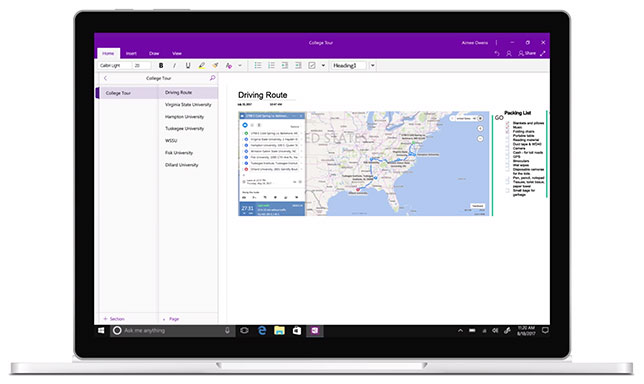
OneNote accessibility updates 

"With the goal of making usage of OneNote within the classroom more accessible and accommodating for students with varying learning styles and abilities, the OneNote team embarked on a year-long journey listening to teachers and incorporating feedback to help inform the redesign of OneNote's user interface," according to information released by Microsoft. "The OneNote redesign brings consistency across apps, improves usability for those with vision and mobility impairments, and simplifies navigation controls."

Microsoft is also offering a new accessibility training course for educators on the use of Office 365. The course is designed to train teachers — especially special ed teachers, though it's open to all — in the creation of accessible documents, revision of older documents to make them accessible and use of Office tools like Skype Translator and Office Lens for accessibility.

The course is free for educators, administrators, parents and students.

About the Author

David Nagel is the former editorial director of 1105 Media's Education Group and editor-in-chief of THE Journal, STEAM Universe, and Spaces4Learning. A 30-year publishing veteran, Nagel has led or contributed to dozens of technology, art, marketing, media, and business publications.

He can be reached at [email protected]. You can also connect with him on LinkedIn at https://www.linkedin.com/in/davidrnagel/ .


Featured

  • Silhouettes of business professionals stand against a blurred futuristic city skyline at night, with a glowing digital network data connection

    It's Time for Higher Ed to Get Serious About AI Strategy

    Without a coordinated strategy that involves multiple academic and administrative units across the entire campus, colleges risk wasting resources, duplicating efforts, and ultimately failing to deliver on the promise of deploying technology to improve learning and operations.

  • large group of college students sitting on an academic quad

    Student Readiness: Learning to Learn

    Melissa Loble, Instructure's chief academic officer, recommends a focus on 'readiness' as a broader concept as we try to understand how to build meaningful education experiences that can form a bridge from the university to the workplace. Here, we ask Loble what readiness is and how to offer students the ability to 'learn to learn'.

  • silhouette of business person facing wall of data

    Why AI Strategy Belongs in the President's Office

    Institutions that are succeeding with AI share one thing in common, and it is not a better committee, a larger budget, or a more sophisticated technology stack. It is a president who never handed off the steering wheel.

  • Jason Palm

    AI, Identity, and Speed: Cybersecurity Priorities for Higher Ed

    Fortinet Security Operations Specialist Jason Palm explains how AI is raising new security challenges for higher education, requiring stronger governance, identity protection, threat detection, automation, and incident readiness.