Fujistu Debuts Two New Windows 8-Ready Tablets
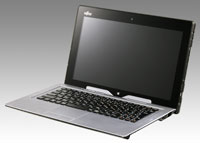
The Fujitsu Stylistic Q702 hybrid tablet has an optional attachable keyboard docking station. |
Fujitsu has expanded its mobile portfolio with two new Windows 8-ready tablets: the Stylistic Q702 and the Lifebook T902.
The Stylistic Q702 hybrid tablet features an 11.6-inch, HD, dual digitizer, multitouch display for pen or touch input. An optional attachable keyboard docking station turns the tablet into a traditional notebook, complete with LAN, USB, and VGA connectivity as well as an additional battery (providing up to 9 hours of battery life).
Powered by a 3rd Generation Intel Core i3 or i5 processor, the Stylistic Q702 weighs in at approximately 1.88 pounds. Security is provided by a biometric fingerprint sensor; Computrace support; HDD and BIOS password protection; embedded Trusted Platform Module; Intel Anti-Theft Technology; and optional Intel vPro Technology.
The tablet also features:
- USB 2.0 and 3.0, HDMI, and SD/SDHC expansion ports
- Accelerometer, gyrometer, magnetometer, and ambient light sensors
- Front-facing and rear-facing webcams with complementing dual microphones for video conferencing
- 64 or 128 GB mSATA SSD
- Intel HD Graphics 4000
- Onboard 4GB DDR3
- Available with Windows 7 Professional at launch (Windows 8 ready)
The newly redesigned Lifebook T902 convertible tablet PC features a frameless 13.3-inch HD anti-glare widescreen display, isolation keyboard, and a variety of other enhancements, including a dual digitizer with 10-finger multitouch support. Thinner and lighter at 4.1 pounds, the tablet is powered by the 3rd Generation Intel Core i5 or i7 processor and boasts an array of security features: dedicated Smart Card Slot; biometric fingerprint sensor; Computrace support; HDD and BIOS password protection; security panel; Intel Anti-Theft Technology; and optional Intel vPro Technology
Other features include:
- Built-in modular bay with quick-release latch for easy interchangeability supports second battery (for up to 11 hours of battery life), second HDD, Super multi DVD-RW, BD-writer, or weight saver
- Optional TCG OPAL compliant SED drives
- Accelerometer, gyrometer, magnetometer, and ambient light sensors
- Anti-microbial, spill-resistant keyboard with trackpad
- DDR3 1600 MHz, up to 16 GB
- Bi-directional display hinge, hard drive shock sensor
- Available with Windows 7 Professional at launch (Windows 8 ready)
Pricing on the Stylistic Q702 starts at $1,099; the Lifebook T902 starts at $1,899. More information is available at the Fujitsu website.
About the Author
Rhea Kelly is editor in chief for Campus Technology, THE Journal, and Spaces4Learning. She can be reached at [email protected].